PSU Buying Guide 2025: How Much Wattage Do You Really Need?
Power supplies are the unsung heroes of every PC build. Learn how to pick the right wattage, efficiency rating, and form factor for your next rig.
Let me tell you a story that still haunts me. A few years back, a friend came to me with a dead PC—his brand-new RTX 4070 had fried along with his motherboard. The culprit? A no-name 500W power supply he'd grabbed because it was ten dollars cheaper than the reputable alternative. The PSU is the one component you absolutely cannot cheap out on, and yet it's the one most builders understand the least. Let's fix that.
Understanding Wattage: The Big Number That Confuses Everyone
When you see a PSU labeled "750W," that number represents the maximum sustained power it can deliver. But here's the thing most people miss: your system almost never draws its maximum rated power. A typical gaming PC with a modern GPU and CPU might idle at 80-120W and only peak at 350-450W during intense gaming loads.
So why not just buy a 500W PSU for a 450W system? Two reasons. First, PSUs operate most efficiently at 50-80% load. A 750W PSU powering a 450W system sits right in that sweet spot, running cooler and quieter while wasting less energy as heat. Second, you want headroom for power spikes—modern GPUs can have transient power spikes that briefly exceed their rated TDP by 50-100%, and if your PSU can't handle those spikes, you'll get shutdowns or worse.
How to Calculate Your Actual Wattage Needs
Here's my simple formula that I've used for dozens of builds: take your GPU's TDP, add your CPU's TDP, add 100W for everything else (RAM, storage, fans, RGB), and then multiply by 1.5. That gives you a comfortable wattage target with plenty of headroom.
For real-world examples in 2025:
- Budget Build (RTX 4060 + Ryzen 5 7600): 115W + 65W + 100W = 280W × 1.5 = 420W → Get a 550W PSU
- Mid-Range Build (RTX 4070 Ti + Ryzen 7 7800X3D): 285W + 120W + 100W = 505W × 1.5 = 758W → Get a 750W or 850W PSU
- High-End Build (RTX 5080 + Ryzen 9 9950X): 350W + 170W + 100W = 620W × 1.5 = 930W → Get a 1000W PSU
Efficiency Ratings Explained: 80 Plus and Beyond
You've probably seen the 80 Plus certification labels—Bronze, Gold, Platinum, Titanium. These ratings tell you how efficiently the PSU converts AC wall power to DC power for your components. The differences matter more than you might think.
An 80 Plus Bronze PSU is about 82-85% efficient at typical loads, meaning 15-18% of the power it draws from the wall is wasted as heat. An 80 Plus Gold unit improves that to 87-90%, and Platinum pushes it further to 89-92%. Over a year of moderate use (6 hours per day), the difference between Bronze and Gold can amount to $30-50 in electricity savings—and that adds up over the PSU's 7-10 year lifespan.
My recommendation for most builders: 80 Plus Gold is the sweet spot. The jump from Bronze to Gold is well worth the extra $15-30 at purchase. Going beyond Gold to Platinum or Titanium offers diminishing returns unless you're building a workstation that runs 24/7.
Modular vs. Non-Modular: The Cable Question
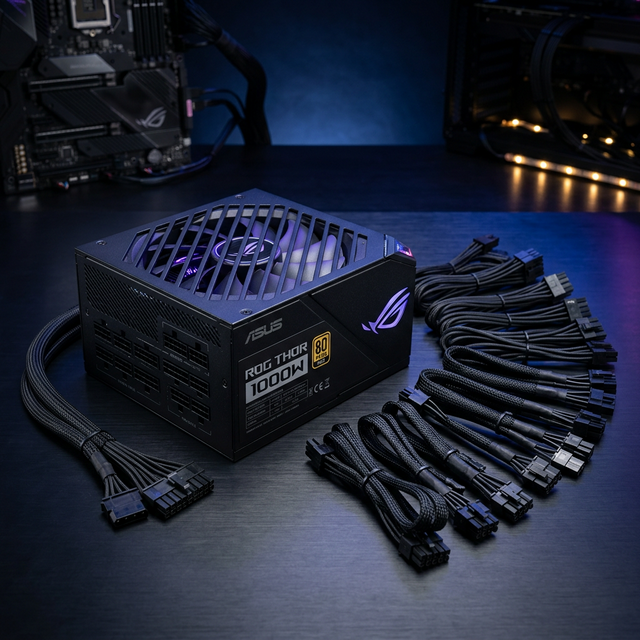
PSUs come in three flavors of cable management: non-modular (all cables permanently attached), semi-modular (essential cables attached, extras detachable), and fully modular (every cable detachable).
For most builders, fully modular is the way to go. You only connect the cables you actually need, which dramatically reduces clutter and improves airflow. The extra cost—usually $10-20 over a comparable semi-modular unit—is absolutely worth it for the cleaner build and easier cable management.
Semi-modular is a solid budget compromise. The permanently attached cables (24-pin motherboard and 8-pin CPU) are ones you'll always need anyway, and you can add GPU and SATA cables as needed. Non-modular PSUs are really only worth considering at the extreme budget end, and even then, I'd encourage spending the extra few dollars for semi-modular.
ATX 3.0 and the 12VHPWR Connector
If you're buying a PSU in 2025, you should strongly consider one that supports the ATX 3.0 standard. The biggest change with ATX 3.0 is the 12VHPWR (or 12V-2x6) connector—a single cable that can deliver up to 600W to power-hungry GPUs, replacing the mess of multiple 8-pin cables that older cards required.
Modern NVIDIA RTX 40 and 50 series cards use this connector, and while adapter cables exist, a native 12VHPWR connection is cleaner, safer, and eliminates the fire risk concerns that plagued early adapter cables. If you're buying a new GPU in 2025, an ATX 3.0 PSU with a native 12VHPWR cable is a must-have.
Brands and Reliability: Who to Trust
Not all PSU brands are created equal, and this is one area where brand reputation genuinely matters. The good news is that several manufacturers consistently produce reliable, well-built units:
- Corsair: The RM and HX series are consistently excellent. Great build quality, quiet operation, and outstanding warranties.
- Seasonic: Often manufactures PSUs for other brands. Their Focus and Prime series are among the most reliable on the market.
- be quiet!: Lives up to their name with some of the quietest PSUs available. The Straight Power and Dark Power series are fantastic.
- EVGA: The SuperNOVA G series offers excellent performance and value, with generous warranty terms.
Avoid unknown brands, especially at suspiciously low prices. A cheap PSU isn't a bargain if it takes your other components with it when it fails. Stick with reputable manufacturers and check independent reviews from outlets like Tom's Hardware, TechPowerUp, or JonnyGuru (now part of Corsair) before buying.
SFX vs. ATX: Size Matters
With the rise of compact builds, SFX power supplies are more popular than ever. These smaller units are designed for ITX and compact mATX cases where a standard ATX PSU simply won't fit. Modern SFX units are impressively capable—Corsair's SF series and Cooler Master's V SFX lineup offer up to 850W in the tiny SFX form factor.
The trade-off? SFX PSUs use smaller fans that can be noisier under load, and they're typically $20-40 more expensive than equivalent ATX units. If your case supports ATX, go with ATX—you'll get more wattage options, quieter operation, and better value. Only choose SFX if your case demands it.
Red Flags: When to Walk Away
Over the years, I've learned to spot the warning signs of a bad PSU before it becomes a problem:
- No 80 Plus certification at all: If it's not even Bronze-rated, the efficiency (and likely the build quality) is suspect.
- Warranty under 5 years: Reputable PSUs come with 7-10 year warranties because the manufacturers trust their products. Short warranties are a red flag.
- Suspiciously lightweight: Quality components weigh more. If a "750W" PSU feels lighter than a textbook, the internal components are probably cutting corners.
- No independent reviews: If nobody reputable has reviewed it, there's probably a reason.
- Price too good to be true: A genuine 750W Gold-rated modular PSU costs at least $80-100. If you're seeing $40 units claiming the same specs, something doesn't add up.
My Top Picks for 2025
Budget: Corsair RM650x (2024) — $90
Fully modular, 80 Plus Gold, near-silent operation with a zero-RPM fan mode, and a 10-year warranty. It's everything a budget-to-mid-range build needs, and Corsair's quality control is top-notch.
Mid-Range: Seasonic Focus GX-850 — $130
850W of Gold-rated power with exceptional voltage regulation and ripple suppression. Includes a native 12VHPWR cable for modern GPUs. Seasonic's reliability speaks for itself.
High-End: be quiet! Dark Power 13 1000W — $230
Titanium efficiency, virtually silent even under full load, and overbuilt with components that will outlast your entire system. If you're building a high-end rig or workstation, this is the PSU to buy.
Final Advice: Invest in Your Foundation
Your PSU isn't sexy. It doesn't show up in benchmark scores or make your games run faster. But it's the single most important component for the long-term health of your entire system. Spend the extra $20-40 on a quality unit from a reputable brand, and you'll have a reliable power foundation that lasts through multiple CPU and GPU upgrades. Your future self—and your wallet—will thank you.
SamXop123
PC Building Expert & Tech Writer
Passionate about PC building and technology, with over 8 years of experience in hardware reviews, system optimization, and helping enthusiasts build their dream rigs. Always eager to explore the latest innovations in the PC building space.