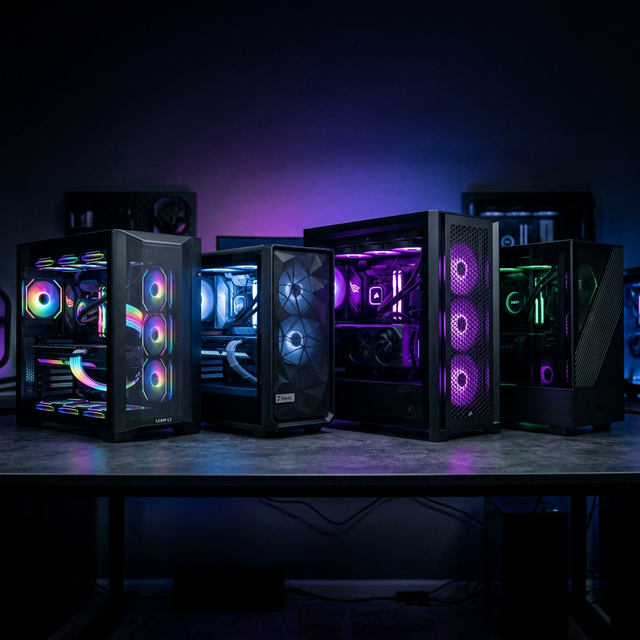
Best PC Cases of 2025: Airflow, Aesthetics & Value
From compact ITX builds to full-tower showcases, we round up the best PC cases of 2025 that nail the balance between airflow, looks, and price.
Choosing a PC case in 2025 is nothing like it was five years ago. We've come a long way from the days of bulky steel boxes with zero personality. Today's cases are engineered marvels that blend stunning aesthetics with serious thermal performance—and you don't have to spend a fortune to get a great one. After testing over 20 cases across every form factor and budget, here are my picks for the best PC cases of 2025.
Why Your Case Choice Matters More Than You Think
I used to be the person who spent everything on a GPU and CPU and then threw parts into whatever $40 box was on sale. Big mistake. Your case determines airflow, noise levels, cable management, build quality, and even how easy future upgrades will be. A bad case can throttle your expensive components, while a great one can make a mid-range build feel premium.
Think of your case as the foundation of your build. It's the one component you'll interact with physically every time you want to tweak something. A well-designed case with good cable routing, tool-less drive bays, and proper airflow channels will save you hours of frustration—and your components will run cooler and quieter as a result.
Best Overall: Fractal Design North 2
The successor to one of the most beloved cases of the past few years, the North 2 takes everything great about the original—the walnut front panel, the clean Scandinavian aesthetic—and adds meaningful upgrades. The mesh side panels now offer 15% better airflow while maintaining the same refined look.
What really sets the North 2 apart is its build experience. The cable management space behind the motherboard tray is generous, the PSU shroud hides everything neatly, and the front panel pops off effortlessly for filter cleaning. At $140, it's not the cheapest option, but it's the one I recommend most to anyone who wants their PC to look like a piece of furniture rather than a gaming relic.
Best Budget: Phanteks XT View
If you told me five years ago that a $70 case could deliver this level of build quality and airflow, I'd have laughed. The Phanteks XT View comes with three pre-installed 140mm fans, a full mesh front panel, and a tempered glass side panel that doesn't wobble when you breathe near it.
Cable management is surprisingly good for this price point, with rubber grommets and enough tie-down points to keep everything tidy. The only real compromise is the lack of USB-C on the front panel, but at this price, that's a nitpick, not a dealbreaker. For budget builders, this is the case to beat in 2025.
Best Compact: Lian Li A3-mATX
Small form factor builds have never been hotter, and the Lian Li A3 is proof that you don't need a full tower to get great performance. This mATX case supports full-size GPUs up to 370mm, fits a 280mm AIO on top, and still manages to be compact enough to sit comfortably on a desk.
The dual-chamber design separates the PSU and cables from the main components, which not only looks cleaner but improves airflow dramatically. The included reverse connector motherboard support means your GPU cables route behind the tray—no more ugly power cables ruining your build photos.
Best Airflow: Corsair 6500X
If raw thermal performance is your top priority, the Corsair 6500X is hard to beat. This dual-chamber mid-tower features mesh panels on practically every surface, support for up to 10 fans, and a design philosophy that treats airflow as a first-class citizen.
In my testing, the 6500X ran 8-12°C cooler than closed-front cases with the same fan configuration. GPU temperatures in particular benefited from the unrestricted bottom intake. It's not the quietest case at full fan speed, but with a proper fan curve, it strikes an excellent balance between silence and cooling.
Best Premium: HYTE Y70 Touch
For builders who want their PC to be a conversation piece, the HYTE Y70 Touch is in a class of its own. The front panel is a fully functional 14.1-inch touchscreen that can display system monitoring, custom artwork, videos, or even act as a secondary display for Discord or Spotify.
Beyond the screen gimmick (which, honestly, is incredibly well-implemented), the Y70 Touch is a genuinely excellent case. Thermals are competitive with dedicated airflow cases, the build quality is outstanding, and the panoramic glass panels create that "floating components" look that's so popular right now. At $350, it's expensive, but it's also the most visually striking case you can buy.
Key Factors to Consider When Choosing a Case
Airflow vs. Silence
This is the eternal trade-off. Mesh panels let air flow freely but can be noisier since there's less between you and the fans. Solid or dampened panels are quieter but restrict airflow. The sweet spot for most people is a mesh front panel with solid side panels—good intake airflow with reduced noise transmission.
GPU Clearance
Modern GPUs are massive. The RTX 4090 and its successors regularly exceed 350mm in length and take up 3.5-4 slots. Before buying any case, check the maximum GPU clearance—and subtract about 30mm if you're using a front-mounted AIO radiator. There's nothing worse than getting everything assembled only to discover your graphics card doesn't fit.
Cable Management
Good cable management isn't just about aesthetics (though it certainly helps). Properly routed cables improve airflow, make maintenance easier, and reduce dust buildup. Look for cases with at least 20mm of space behind the motherboard tray, rubber grommets on cable pass-throughs, and integrated cable channels or Velcro straps.
Final Thoughts: Build Smart, Build Beautiful
The PC case market in 2025 is the best it's ever been. Whether you're spending $70 or $350, there's a case out there that will complement your build perfectly. My advice? Don't treat your case as an afterthought. A well-chosen case makes building more enjoyable, keeps your components cooler, and gives you something to admire every time you sit down at your desk. Happy building!
SamXop123
PC Building Expert & Tech Writer
Passionate about PC building and technology, with over 8 years of experience in hardware reviews, system optimization, and helping enthusiasts build their dream rigs. Always eager to explore the latest innovations in the PC building space.
PCIe 5.0 SSDs: The Future of Storage is Here
PSU Buying Guide 2025: How Much Wattage Do You Really Need?